

I Set a Trap for Hackers With a Fake Credit Card File_
Building a honeyfile intrusion detector in Python — what a honeyfile actually is, how the script works, how to run one on your own box tonight, and the limitations nobody puts in the README.
If you spend enough nights staring at camera feeds, one rule of security burns itself into your brain: the person who notices something is wrong early wins. Not the person with the most expensive firewall. The one who gets the first signal.
Here’s the uncomfortable thing about most home labs and small setups — if someone got inside right now, you’d have basically no way of knowing. No alarm. No tripwire. Nothing. So I built the digital version of leaving a marked $20 bill on the counter: a file that looks juicy, holds absolutely nothing real, and screams the moment anyone lays a finger on it.
This is a walkthrough of Honeyfile Security Monitor — a small Python tool I put on GitHub that picked up a few stars (hence this writeup). By the end you’ll know what a honeyfile is, roughly how the script works, how to run one yourself, and — the part I care about most — what it actually tells you versus what it only looks like it tells you.
A honeyfile is a decoy nobody should ever touch. This script watches one, and the instant it’s modified / moved / deleted it logs a forensic snapshot of the machine and pings you on Discord or email. ~20MB RAM, runs 24/7, near-zero false positives. Repo’s here.
01 What even is a honeyfile?
# the cheese on the mousetrap
A honeyfile (you’ll also hear canary file or decoy) is exactly what it sounds like: bait. You drop a file somewhere with a name that screams “open me” — something like CreditCards_2026.xlsx or passwords_backup.txt — and you fill it with total garbage. Fake card numbers, fake creds, nonsense.
Here’s the magic, and it’s worth sitting with for a second: a legitimate user has zero reason to ever open that file. You know it’s fake. Your roommate doesn’t know it exists. So if anything ever touches it, that’s not noise — that’s a signal. One of the cleanest signals in all of detection, because the false-positive rate is basically nothing.
Compare that to a normal log file or a loud IDS, where you’re drowning in thousands of “maybe” events trying to spot the one that matters. A honeyfile flips the whole problem around. You’re not looking for a needle in a haystack — you’ve left a single needle out in the open and wired it to an alarm. This is classic defense in depth and assume-breach thinking: you accept that someone might get in, and you make sure they trip over something on the way to the good stuff.
02 What the tool actually does
# the 30-second version
The script watches one decoy file and does nothing — quietly, cheaply — until that file changes. The instant it’s modified, moved, deleted, or recreated, it springs:
It grabs a snapshot of the machine’s current state (more on what that really means below), writes a clean structured line to a log file, prints a big can’t-miss alert to the terminal, and — if you turned them on — fires a Discord webhook with an @everyone ping and/or an email. That’s it. Small, boring, reliable. The best kind of security tool.
03 How it works under the hood
# watchdog → inotify → your code
There are really only three moving parts here, and once you see them the whole thing clicks:
The clever-but-free part is inotify — a Linux kernel feature that lets a program subscribe to filesystem events. No polling, no “check the file every second” loop burning CPU. The kernel taps you on the shoulder the moment something happens. The Python watchdog library is just a friendly wrapper around that.
You hand watchdog an event handler — a class with methods like on_modified and on_deleted — and it calls them for you. The whole handler skeleton is tiny:
class HoneyHandler(FileSystemEventHandler):
    def on_modified(self, event): self.handle_event("MODIFIED", event)
    def on_moved(self, event):    self.handle_event("MOVED", event)
    def on_deleted(self, event):  self.handle_event("DELETED", event)
    def on_created(self, event):  self.handle_event("CREATED", event)
Every one of those funnels into a single handle_event method. And the most important line in the entire project lives right at the top of it:
def handle_event(self, event_type, event):
    if event.src_path == HONEYPATH:        # <-- only react to OUR file
        info  = self.get_system_info()
        alert = self.format_alert_message(event_type, info)

        logging.warning(log_entry)            # persistent log
        print(alert)                          # terminal
        self.send_discord_alert(alert)        # Discord webhook
        self.send_email_alert(subject, alert) # email (optional)
That if event.src_path == HONEYPATH check is doing the heavy lifting. watchdog watches the whole directory (it has to — that’s how inotify works), so it’ll see every file change in that folder. The guard makes sure we only sound the alarm for the one file we care about and ignore everything else.
04 The “forensic” snapshot — and what it really tells you
# read this part, it’s the honest one
When the alarm trips, get_system_info() scrapes together a bunch of context: hostname, OS and architecture, local IP, MAC address, the username and UID, system uptime, a count of active network connections, and the top 5 processes by CPU. On paper that reads like a CSI episode.
Here’s the part most honeyfile tutorials conveniently skip, and I’d rather you hear it from me:
The IP and MAC address in that snapshot are your own machine’s — not some remote attacker’s. This tool runs on the box and describes the box. It will not geolocate a hacker in another country.
What it is genuinely good at: catching a local actor. If a logged-in user or a runaway script on that machine opens the bait, the username, UID, and top processes fields are gold — that’s real attribution. For remote/network attribution you’d need packet capture or auth logs, which is a different tool entirely.
I’m calling this out because being precise about what your evidence proves is the entire job in security. A tool that quietly overstates itself is worse than one that’s modest and accurate. So: think of this as a high-confidence tripwire with local context, not a global attacker-tracker. For a home lab or a single Pi, that’s exactly the right tool — and you’ll see proof of this in my own alert further down.
05 Set one up tonight
# Raspberry Pi or any Linux box
Step 1 — install the dependencies
# most setups
$ pip3 install watchdog requests

# or, on Raspberry Pi OS / Debian
$ sudo apt install python3-watchdog python3-requests -y
Step 2 — bake the bait
Make a file that looks irresistible and is 100% fake. Never, ever put real data in here — the whole point is that it’s safe if it leaks.
$ cat > ~/Desktop/CreditCards_2026.xlsx << EOF
Account Number,Cardholder Name,CVV,Expiry,Balance
4532-1234-5678-9010,John Doe,123,12/27,15234.56
5555-4444-3333-2222,Jane Smith,456,06/28,8901.23
EOF
Step 3 — point the script at it
Open honeyfile.py and edit the config block up top. At minimum set the path; add a Discord webhook if you want phone alerts.
HONEYPATH = "/home/YOUR_USER/Desktop/CreditCards_2026.xlsx"
LOGFILE   = "/var/log/honeyfile.log"

DISCORD_WEBHOOK_URL = "https://discord.com/api/webhooks/..."
ENABLE_DISCORD = True # flip this onServer Settings → Integrations → Webhooks → New Webhook → copy the URL. Drop it into the config above and you’ll get a pinged alert on your phone the second the trap fires.
Step 4 — run it
$ python3 honeyfile.py

🍯 Enhanced Honeyfile Watcher Starting...
📁 Monitoring: /home/you/Desktop/CreditCards_2026.xlsx
🔔 Discord alerts: ENABLED
📧 Email alerts:   DISABLED
Step 5 — trip your own wire
Open a second terminal and poke the file. You should get an instant alert in all your channels.
$ echo "9999-8888-7777-6666,Intruder,999,01/30,999999.99" >> ~/Desktop/CreditCards_2026.xlsx06 Reading the alert
# a real trap firing on my Pi
Here’s an actual alert that landed in my Discord the moment I touched the bait file on my Pi-hole box. The full forensic block goes to Discord and the terminal; the log file gets a tidy one-liner.
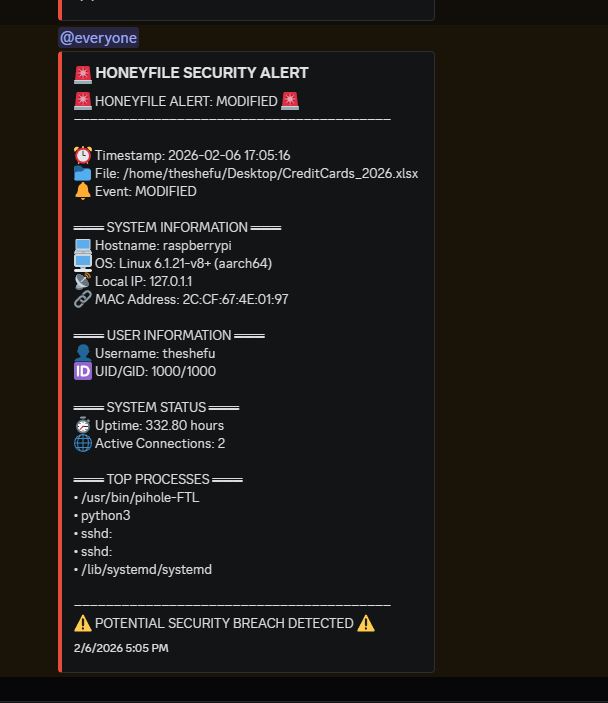
python3 watcher and pihole-FTL.The log file is built for grepping at 4am when you’re scrolling back through a week of activity:
2026-02-06 17:05:16 - ALERT: MODIFIED | User: theshefu | Host: raspberrypi | IP: 127.0.1.1 | MAC: 2C:CF:67:4E:01:97Because every line is structured the same way, you can slice it with plain old grep:
$ grep "MODIFIED" /var/log/honeyfile.log   # every modify event
$ grep -c "ALERT:" /var/log/honeyfile.log    # total trips
$ sudo tail -f /var/log/honeyfile.log       # watch live
07 Run it 24/7
# systemd so it survives reboots
A tripwire that only works while a terminal is open isn’t much of a tripwire. Wrap it in a systemd service and it starts on boot and auto-restarts if it ever crashes:
$ sudo cp examples/honeyfile.service /etc/systemd/system/
$ sudo systemctl daemon-reload
$ sudo systemctl enable --now honeyfile.service
$ sudo systemctl status honeyfile.service     # confirm it's alive
08 What actually trips the wire
# reads vs. writes — an important gotcha
This surprises everyone at first, so let’s be clear about it. inotify reports changes to the filesystem, not reads. That means a plain cat of the file slips by silently — reading it doesn’t modify anything.
| Action | Alert? | Event |
|---|---|---|
Read it (cat, less) |
✗ no | — |
Append (echo >>) |
✓ yes | MODIFIED |
Edit & save (nano, vim) |
✓ yes | MODIFIED |
Move / rename (mv) |
✓ yes | MOVED |
Delete (rm) |
✓ yes | DELETED |
Touch (touch) |
✓ yes | MODIFIED |
Copy (cp) the original |
✗ no | — |
Catching a pure read (someone opening the file to peek without changing it) needs auditd with a watch rule on the file — that taps a deeper kernel layer. It’s heavier to set up, so for most home labs the write-based version here covers the realistic threat: an attacker who exfiltrates, edits, or deletes.
09 Stuff I fixed (and what I’d tell past me)
# the honest maintenance notes
Putting this on GitHub forced me to actually look at my own code with fresh eyes. A few things worth flagging if you fork it:
A sneaky placeholder typo. The original Discord guard compared the webhook against a placeholder string that had a typo — "YOUER_..." in the check vs "YOUR_..." as the default. So the “is this configured yet?” safety check never actually matched, and a half-configured script could try to fire at a junk URL. One-character bug, exactly the kind that hides in plain sight:
# before — typo means the guard never triggers
if DISCORD_WEBHOOK_URL == "YOUER_DISCORD_WEBHOOK_URL_HERE":

# after — matches the real default
if not ENABLE_DISCORD or DISCORD_WEBHOOK_URL == "YOUR_DISCORD_WEBHOOK_URL_HERE":
    return
Credentials sit in plaintext. The Discord URL and (if you use it) the email app-password live right in the script. That’s fine for a private box, but you do not want to commit those to GitHub. Move them to environment variables or a .env file, and make sure your .gitignore excludes it. That’s literally why the repo ships with a .gitignore — don’t be the person who leaks their own webhook.
One file at a time. Right now it watches a single honeyfile. Watching a whole fleet of decoys across different directories is the obvious next upgrade.
10 Where to take it next
# open issues / fork bait
- Watch multiple honeyfiles across several directories at once
- Slack / Microsoft Teams webhooks alongside Discord
- SMS alerts via Twilio for the can’t-miss stuff
- SQLite backend + a tiny web dashboard for alert history
- Pull credentials from env vars / a secrets manager instead of plaintext
- Docker image so it deploys anywhere in one command
If you build any of these, open a PR — I’d love to see it. And if you’re newer to this than I am, honestly, fork it and break it. Reading and wrecking a small working tool taught me more about Linux filesystems and event-driven code than any course did. That’s the whole reason I write this blog: I’m a beginner figuring it out on overnight shifts, writing the explainer I wish I’d had.
You don’t need an enterprise budget to get an early-warning signal. You need one fake file nobody should touch, and something watching it. That’s a honeyfile.








Leave a Reply