
How People Actually Get Hacked in 2026 (And 7 Dead-Simple Ways to Not Be Next)
Clocking in for the overnight shift, and tonight we’re doing something a little different.Most “don’t get hacked” articles read like they were written in 2014. Use a strong password, don’t click weird links, the end. Cool. Useful for about a decade ago.
The problem is the people trying to get into your accounts didn’t stop leveling up. While you were reusing the same password you’ve had since high school, they picked up AI voice cloning, fake QR codes, and a trick that literally gets you to install the malware for them.
So here’s the deal. I spend my nights buried in security stuff, and I wanted to write the one guide I’d send to my mom, my coworker, anybody who isn’t “techy” but doesn’t want to wake up to a drained bank account. No jargon. No fear-mongering. Just the actual ways regular people are getting got in 2026, and the boringly simple stuff that stops most of it.
Let’s clock in.
First, the mindset shift that matters most
You don’t get hacked because some hoodie genius in a dark room targeted you specifically. That almost never happens to normal people.
You get hacked because of volume. Attackers fire off millions of attempts at once and just wait for someone tired, distracted, or in a hurry to slip. Around 3.4 billion phishing emails go out every single day. You’re not being hunted. You’re being fished for, along with everybody else.
That’s actually good news. It means you don’t have to be unhackable. You just have to be more annoying to hack than the average person, and the average person is doing almost nothing. A handful of small habits puts you way ahead of the pack.
Okay. The seven ways.
01Phishing & “smishing” — the old reliable that still wins
This is the classic, and it’s still the number one way people get popped, because it just works.
Phishing is a fake message pretending to be someone you trust: your bank, Amazon, the IRS, Netflix telling you your payment failed. The goal is to get you to click a link and type your password into a fake login page that looks exactly like the real one.
The 2026 twist is that it moved off email and onto your phone. Text-message phishing (“smishing”) now makes up roughly two-thirds of all mobile phishing. Think: “USPS: your package couldn’t be delivered, confirm your address here.” “Your bank account is locked, verify now.” That fake-toll-road text everybody’s been getting? That’s the one.
Why it works: It creates panic. Your account’s locked! Your package is stuck! Urgency shuts off the part of your brain that double-checks things.
- Never log in through a link in a message. Ever. Open the app or type the website in yourself.
- Real companies don’t threaten you into clicking in the next 10 minutes.
- When in doubt, call the company using the number on the back of your card or their official site, not any number in the message.
02Using the same password everywhere
Here’s a brutal stat: around 94% of people reuse passwords. And that one habit quietly powers a huge chunk of account takeovers.
It works like this. Some company you signed up for years ago gets breached and their password list leaks. Attackers grab that list and just… try your email and password on everything else. Gmail, your bank, Instagram, PayPal. This is called “credential stuffing,” and it’s automated and instant. Over 429 million social media accounts got hijacked in 2025 alone, a lot of them exactly this way.
So your weakest, most forgotten account becomes the key to your most important one.
- Use a password manager. Bitwarden is free and great; 1Password is excellent if you want to pay. It makes a different random password for every site and remembers them so you don’t have to.
- If a password manager feels like too much right now, at minimum make sure your email and your bank have unique passwords nothing else shares. Your email is the master key, because that’s where every “reset my password” link goes.
This is the single highest-impact thing on this entire list. If you do nothing else, do this one.
03AI voice clones & deepfakes — the new nightmare
This is the one that genuinely scares me, because it’s so new most people have no defense built up against it yet.
Scammers can now clone a voice from just a few seconds of audio, the kind of clip anybody can grab off TikTok, Instagram, or a voicemail greeting. Then they call a family member sounding exactly like you, panicked, saying you’re in trouble and need money right now.
This isn’t theoretical. Of the AI-fraud cases studied recently, about 81% involved a deepfake of someone’s voice, video, or image. A woman in Florida handed over $15,000 after scammers cloned her daughter’s voice. A British widow lost £500,000 to a romance scam using a fake version of a celebrity. The fakes are good enough that “but it sounded just like them” is now exactly the problem.
- Set up a family safe word. A random word only your real family knows. If you get a panicked “it’s me, I need money” call, ask for it. A scammer with a cloned voice won’t have it.
- If anyone calls in a crisis asking for money or gift cards, hang up and call that person back on their real number. A real emergency survives a 30-second callback.
- Be suspicious of urgency plus money. That combo is the whole scam, every time.
04Fake QR codes (“quishing”) — the sticker scam
QR codes are everywhere now: menus, parking meters, payment screens. Scammers noticed.
“Quishing” is when someone slaps a fake QR sticker over a real one, or sends you a code in an email. You scan it expecting a menu or a parking payment, and instead you land on a fake page that steals your card info or login. Because the actual web address is hidden inside the code, you can’t eyeball it the way you’d check a suspicious link.
This is exploding. Microsoft tracked a 146% jump in QR-code phishing in just the first three months of 2026. The hot spots right now are parking meters, restaurant tables, and EV charging stations, places where you’re already pulling out your phone and your wallet on autopilot.
- At parking meters and on payment signs, check if the QR code is a sticker placed over something else. Peel-test it with your thumb. Real ones are usually printed into the sign.
- After scanning, look at the web address before you type anything. If it’s a weird, random, or misspelled URL, back out.
- For parking and payments, just use the official app or pay another way. The scan is convenience, not a requirement.
05“Verify you’re human” pages that make you hack yourself
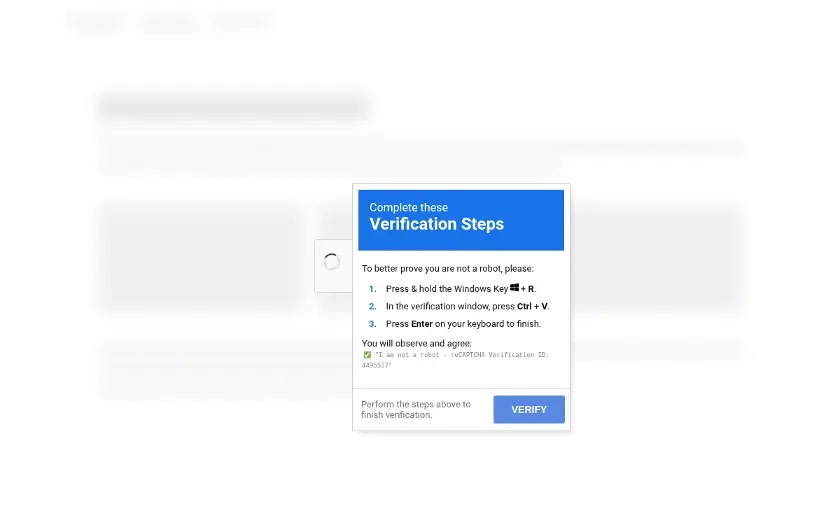
This is the cleverest, nastiest new trick going, and almost nobody’s heard of it yet. It’s called ClickFix, and detections of it shot up more than 500% recently.
You visit a normal-looking website (often a legit site that got compromised) and a “verify you’re human” or Cloudflare-style box pops up. But instead of clicking a checkbox, it tells you to do a few “verification steps”: press the Windows key + R, paste, hit Enter. Or on a Mac, paste a command into Terminal.
What you’ve actually just done is paste in a command, copied to your clipboard without you knowing, that installs malware. The genius and the evil of it is that you infect your own computer. There’s no sketchy download for your antivirus to catch. You opened the door yourself because it felt like one more annoying verification hoop.
- Burn this rule into your brain: a real website will NEVER ask you to press keyboard shortcuts, open a command window, or paste-and-run anything to “prove you’re human.” Never. A real CAPTCHA is a checkbox or a “pick the buses” puzzle. That’s it.
- If a page gives you copy-paste “verification instructions,” close the tab immediately. You didn’t fail a test. You dodged an attack.
06Cracked software & fake downloads (info-stealers)
The free version of expensive software. The “cracked” game. The video downloader you found on a random site. A lot of these are wrapped in info-stealer malware that quietly vacuums up your saved passwords, browser cookies, and crypto wallets and ships them off to a stranger.
Fake “update your browser” pop-ups and fake job-listing files fall in the same bucket. The bait changes; the goal is always to get a program of theirs running on your machine.
- Download apps from official sources only: the real website, the App Store, Google Play, Microsoft Store.
- “Free cracked [expensive thing]” is almost never free. You pay with your accounts.
- If a website pops up telling you your browser or Flash or a codec is out of date, ignore it. Update software from the program itself, never from a pop-up.
07You can’t stop the breach, but you can shrink the damage
Here’s the uncomfortable truth: some of your data is already sitting in a leak somewhere. Companies you trusted got breached. That part genuinely isn’t your fault and isn’t fully in your control.
What is in your control is the blast radius, how much damage one leaked password can do. And the tool for that is two-factor authentication (2FA).
2FA means that even with your password, an attacker still needs a second thing, a code from your phone, to get in. It’s the seatbelt of the internet. Studies consistently show it blocks the overwhelming majority of automated account-takeover attempts.
- Turn on 2FA for your email, bank, and main social accounts today. It’s in the security settings, takes two minutes each.
- Use an authenticator app (Google Authenticator, Authy) over text-message codes when you can. Text codes are better than nothing but can be stolen via “SIM swapping.”
- Check if your info has already leaked at haveibeenpwned.com (free, legit, run by a well-known security researcher). If your email shows up, change those passwords.
The 5-minute version: do these tonight
Don’t have it in you to read all that? Fair. Here’s the whole article boiled down to five things. Do them before bed and you’ve shut down most of what’s out there:
run ./lock-it-down.sh
- Turn on 2FA for your email and bank. (Seatbelt. Non-negotiable.)
- Give your email and bank their own unique passwords nothing else uses.
- Set a family safe word for those “it’s me, I need money” calls.
- Never log in from a link in a text or email. Open the app yourself.
- Never paste-and-run anything to “prove you’re human.” Close the tab.
That’s it. You don’t need to be paranoid and you don’t need to be a tech genius. You just need to be a harder target than the person who did none of this, and now that’s not you.
Stay safe out there. I’ll be up all night anyway, so if something weird happens to one of your accounts and you’re not sure what it is, that’s exactly the kind of thing this blog exists for.
Clocking out.



Leave a Reply