
incidents · malware · explained plainly
The Fake CAPTCHA That Turns Off Your Antivirus: ClearFake Explained
There's a fake CAPTCHA going around that gets you to infect your own computer — and the newest version disables your security software before it steals from you. Here's how it actually works, in plain English, and how to spot one.
You've clicked a thousand CAPTCHAs. "I'm not a robot," pick the traffic lights, move on. So when a site pops one up that says "Verify you are human" with a couple of extra steps, most people just do the steps. That reflex is exactly what fake CAPTCHA malware is built to exploit. The scam is called ClickFix, the crew that's been running the biggest version of it is tracked as ClearFake, and this week it got a lot nastier: the current chain doesn't just steal your passwords and crypto, it kills your endpoint protection first so nothing gets in the way.
I want to walk through this one carefully, because it's the rare attack that doesn't need a zero-day, doesn't need you to download a shady .exe, and works on a fully patched Windows machine. It needs one thing: you, pressing three keys because a web page told you to.
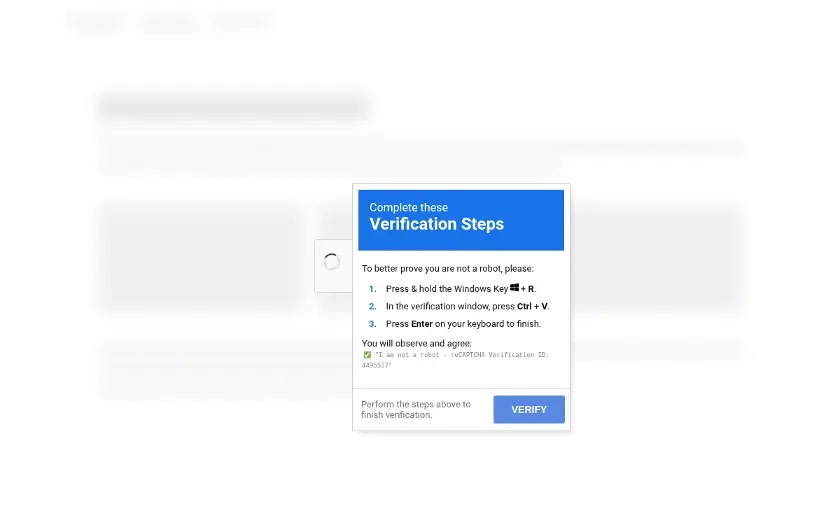
What a ClickFix fake CAPTCHA actually does
A real CAPTCHA asks you to click a box. A ClickFix fake CAPTCHA asks you to run a command. It's dressed up as verification steps, usually something like:
- Press
Win + R - Press
Ctrl + V - Press
Enter
What you don't see is that the page already put a malicious PowerShell command on your clipboard the moment you clicked "I'm not a robot." Win + R opens the Windows Run box. Ctrl + V pastes the command. Enter runs it. You've just launched malware with your own hands — and because you executed it, a lot of security tools treat it as a normal user action.
Why ClearFake is different from the fake CAPTCHAs you've seen before
ClickFix isn't new. It's been kicking around since 2024, and the usual payload has been an info-stealer — Lumma Stealer is the one Microsoft has flagged as the most common. What changed in September 2026 is what happens after you paste.
According to Cisco Talos's writeup, researchers spotted the new chain after noticing strange remote library execution on a Ukrainian government machine back in April 2026, and they assess it was part of a broad theft operation rather than a targeted hit on that one org. Here's the chain, simplified:
- You land on a hacked website. Usually a legitimate WordPress site the attackers compromised and quietly injected a small piece of JavaScript into. You didn't go looking for malware. You were reading a recipe or a forum thread.
- The script fetches its instructions from a blockchain. This is a technique called EtherHiding — the attackers store their payload instructions in a smart contract so there's no server for anyone to take down. Talos observed the code being pulled from BNB Smart Chain. Blockchains don't have an abuse desk.
- The fake Google CAPTCHA appears. Win+R, Ctrl+V, Enter. You "verify."
- A remote loader pulls a disguised library over WebDAV. Instead of downloading an obvious .exe, the command tells Windows to load a DLL straight off a remote share. Fewer files touch your disk, which means fewer things for antivirus to scan.
- Your security tools get killed. This is the new part. The chain abuses a vulnerable, legitimately signed driver (reported as
DCRCVDrv.sys) to terminate endpoint protection processes from the kernel. This is a "bring your own vulnerable driver" (BYOVD) attack — the driver is real and signed, so Windows trusts it, and the malware uses that trust to shut your defenses off. - Then it steals. Talos saw the chain deliver Amatera stealer for browser passwords and session cookies, plus a component called ZigCryptoStealer that watches your clipboard and swaps crypto wallet addresses when you copy one — so you paste the attacker's wallet instead of yours and never notice. One branch also installed NetSupport Manager, a legit remote-control tool, for hands-on access later. Talos assessed with moderate confidence that branch was run by a Russian threat actor.
Read that chain again and notice what's not in it. No exploit. No unpatched bug. No attachment. The "vulnerability" is a human doing three keystrokes because a page asked politely.
How big is this actually?
Big enough that it's not a niche threat anymore. One ClearFake-variant campaign was reported to have likely infected more than 147,000 systems between late August 2025 and early 2026. The U.S. Department of Health and Human Services put out a sector-wide warning about ClearFake for healthcare back in October 2024. And it keeps mutating — Microsoft documented a DNS-based ClickFix variant in early 2026 that fetches its second stage through DNS lookups specifically to slip past URL blocking. Every time defenders block one delivery path, the kit gets a new one. It's cheap, it works against fully patched machines with EDR, and there's no reason to expect it to go away.
Background on the earlier stages of this campaign: Darktrace's ClearFake analysis, which caught the mshta-based delivery variant in the wild.
How to tell a fake CAPTCHA from a real one
This is the section to bookmark. Real verification is boring and self-contained; fake verification asks you to leave the browser.
| Real CAPTCHA | Fake (ClickFix) CAPTCHA |
|---|---|
| Stays inside the web page | Tells you to press keyboard shortcuts or open Run / Terminal / PowerShell |
| Click a box, pick images, maybe type distorted text | Lists "steps" that involve Win + R, Ctrl + V, or copying a command |
| Never touches your clipboard | Silently loads a command into your clipboard when you click |
| Appears at login, checkout, or signup | Appears randomly on a blog, download site, or fake "error" page |
| Google / Cloudflare branding is the real widget | Branding is a picture of the widget — sometimes the domain is faked to look like verification.google |
The last row is worth dwelling on. Talos noted one branch of this campaign using a loader labeled "verification.google" — the attackers know the brand you trust and they'll wear it. Don't trust a logo. Trust the behavior: if it wants you to run something, it's not a CAPTCHA.
If you already ran the command
- Disconnect from the internet (pull the cable or turn off Wi-Fi). This cuts off the stealer's exfiltration and any remote-control session.
- Change your passwords from a different, clean device — email first, then banking, then anything with saved payment info. Info-stealers grab saved browser passwords and session cookies, so also log out of everything everywhere from your account security pages to kill stolen sessions.
- Check your crypto wallets if you have any, and treat any address you've copy-pasted recently as suspect.
- Do a full offline scan or, honestly, reimage. Because this chain kills EDR from the kernel, a reinstall of Windows is the only thing I'd personally trust. It's less work than untangling a drained account.
- Turn on MFA on everything that lets you, so a stolen password alone isn't enough next time.
For the SOC / homelab crowd: what to watch for
If you're on the defending side (or, like me, building a homelab to practice being on the defending side), this campaign leaves a distinctive trail:
- Process tree tells the story.
explorer.exe→powershell.exeormshta.exelaunched from the Run dialog, with a long encoded command line. Users don't type that. Alert on it. - Outbound WebDAV from a workstation. Rundll32 or a loader pulling a DLL over WebDAV from a random external host is not normal user behavior.
- Driver loads. Watch for new kernel drivers being installed, especially known-vulnerable ones. Microsoft's vulnerable driver blocklist exists for exactly this.
- Security process termination. If your EDR agent stops reporting, treat loss of visibility itself as the alert. It's often the attacker's first goal, not a glitch.
- DNS to non-corporate resolvers. The newer DNS-based ClickFix variants hardcode external DNS servers to dodge filtering — block direct port-53 traffic that doesn't go through your sanctioned resolver.
- Cheap preventions that actually work: disable the Run dialog via Group Policy for users who don't need it, block
mshta.exeexecution, and use behavior-based endpoint detection with clipboard monitoring. And show users a screenshot of the actual fake prompt in training — generic "don't click phishing links" advice does not transfer to this lure at all.
The part that gets me
I sit in a command center for a living. A lot of my job is watching for the moment something routine turns into something that isn't. And what's unsettling about ClearFake is that there's no dramatic moment. No red alert. It's a beige verification box on a recipe blog, and the person clicking it is doing exactly what a hundred other websites have trained them to do. The attackers didn't break the technology. They borrowed the most trusted five-second ritual on the internet and put a payload behind it.
So the defense isn't a product. It's one sentence you repeat until it's a reflex: a CAPTCHA never asks you to run something. Tell your parents. Tell the coworker who "just clicked through it." That sentence is worth more than most software.
FAQ
- What is fake CAPTCHA malware?
- A social-engineering attack (nicknamed ClickFix) where a page mimicking Google reCAPTCHA or Cloudflare tells you to press Win+R, paste, and hit Enter. The "verification" is actually you running a malicious command that installs an info-stealer or remote access tool.
- What is ClearFake?
- ClearFake is the name researchers use for a long-running campaign that injects fake CAPTCHA prompts into hacked websites. Its September 2026 version adds a step that disables endpoint security using a vulnerable signed driver before stealing credentials and crypto.
- Can a fake CAPTCHA infect my computer just by appearing?
- Generally no. The attack depends on you following the "verification steps" and running the pasted command. If you close the tab without pressing anything, you're almost certainly fine.
- I pasted a command from a CAPTCHA — what do I do?
- Disconnect from the internet, change passwords from a clean device (email and banking first), log out of all sessions, check any crypto wallets, and strongly consider reinstalling Windows since this variant can disable your antivirus.
- How do I know if a CAPTCHA is real?
- A real CAPTCHA stays inside the browser and only asks you to click, select images, or type. Any CAPTCHA that asks you to press keyboard shortcuts, open a terminal, or paste a command is fake.
- Does antivirus stop ClickFix attacks?
- Not reliably. Because you run the command yourself, it can look like legitimate activity — and the current ClearFake chain specifically terminates security software early in the infection. Behavior-based detection and user awareness matter more than a signature scanner here.
// Alex — OvernightHacker.com. Command center by day, blinking cursor by night. If you've seen one of these prompts in the wild, send me a screenshot — I'm collecting them for a follow-up.






Leave a Reply